Selecting an optimal ethernet switch requires matching the internal backplane capacity to concurrent traffic loads, provisioning adequate PoE power reserves per IEEE standards, and selecting modular SFP uplinks to avoid transmission bottlenecks across copper and optical domains.
01Ethernet switch architecture and switching fabric capacity
An ethernet switch operates as a multiport Layer 2 bridge that inspects ingress frames and forwards traffic directly to destination ports using a Media Access Control (MAC) address table. Deploying the right ethernet switch inside an enterprise, industrial plant, or data centre cabinet ensures deterministic low-latency throughput without head-of-line blocking or frame loss during packet bursts. Modern platforms execute forwarding decisions inside dedicated Application-Specific Integrated Circuits (ASICs), eliminating CPU-bound software routing delays.
Switching fabrics generally implement either store-and-forward or cut-through switching architectures. Cut-through architectures inspect only the destination MAC address—the first 6 bytes of the IEEE 802.3 Ethernet frame—before immediately beginning egress transmission, yielding packet latencies below 1 microsecond. Conversely, store-and-forward architecture buffers the entire frame to verify the Frame Check Sequence (FCS) cyclic redundancy check (CRC) according to IEEE 802.3 Clause 3.2.9. While store-and-forward introduces 3 to 15 microseconds of packet latency depending on frame size, it prevents corrupt or runt frames (fewer than 64 bytes) from propagating downstream.
Backplane bandwidth, or switching capacity, defines the aggregate volume of data the internal fabric transfers across all ports simultaneously. To achieve non-blocking wire-speed forwarding across full-duplex links, the internal matrix throughput must equal twice the sum of every physical port speed. For example, a 24-port Gigabit switch requires 48 Gbps of internal fabric bandwidth (24 ports × 1 Gbps × 2 directions) to prevent packet congestion under maximum simultaneous interface load.
02RJ45 switch port design and copper physical layer standards
An rj45 switch relies on standard 8-pin modular connectors operating balanced twisted-pair copper cabling to link end devices up to 100 metres away. Copper physical layers are defined by IEEE 802.3 standards, including 1000BASE-T (IEEE 802.3ab), 2.5GBASE-T (IEEE 802.3bz), and 10GBASE-T (IEEE 802.3an). Category 5e cabling supports 1 Gbps transmission across 100 metres, whereas 2.5G and 10G speeds require Category 6 or Category 6a shielded foil twisted-pair (F/UTP) cabling to mitigate alien crosstalk (ANEXT) defined under TIA-568.2-D.
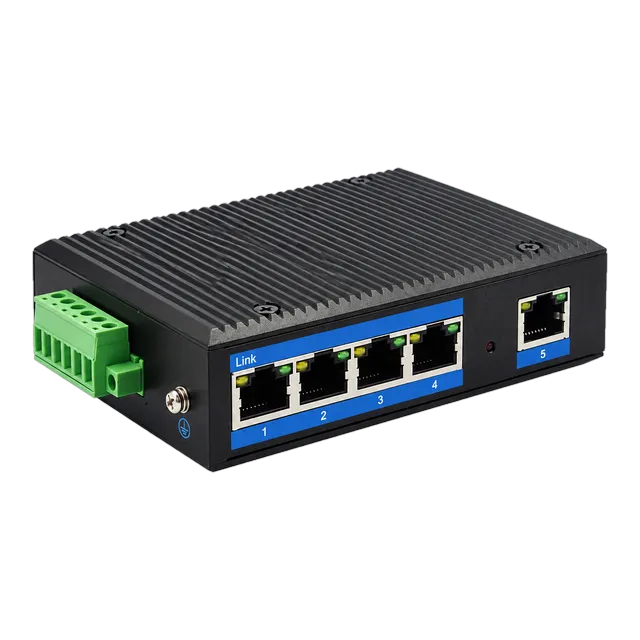
Hardware implementations incorporate auto-negotiation protocols governed by IEEE 802.3 Clause 28, exchanging 16-bit Fast Link Pulse (FLP) word bursts to mutually agree on data rate, duplex state, and Master/Slave timing roles. In industrial environments, copper ports face common-mode electromagnetic interference (EMI), voltage spikes, and ground potential differences. To withstand high-voltage spikes, ruggedised units like the Outdoor Industrial Gigabit Ethernet Switch — 5× RJ45 Port feature 4 kV to 6 kV surge protection across differential signal lines alongside galvanic isolation transformers.
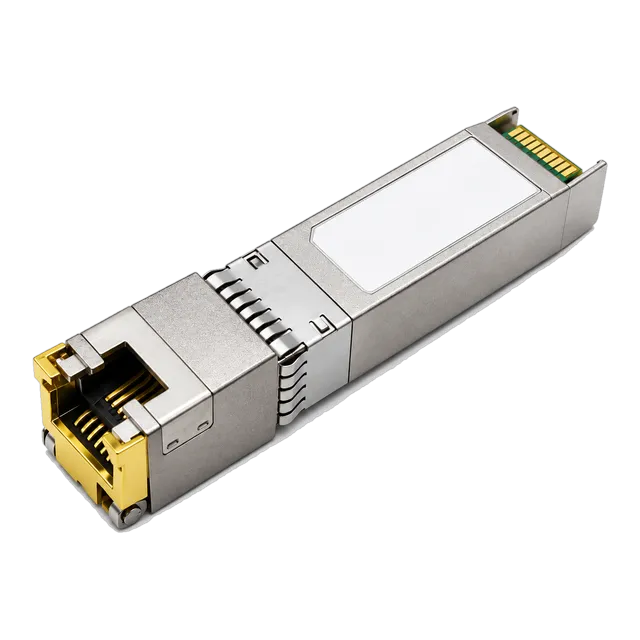
For enterprise switches that contain modular optical ports alongside copper interfaces, modular transceivers bridge copper patch bays directly to high-density backplanes. Network engineers utilise specialised transceivers like the 10G SFP+ to RJ45 Copper 10GBASE-T 30m Cat6a/Cat7 transceiver to add discrete copper host links to optical aggregation chassis without installing dedicated copper switch blades.
03Layer 2 switching versus Layer 3 hardware routing engines
A Layer 2 switch directs traffic based solely on hardware MAC address entries stored in Content Addressable Memory (CAM), whereas a Layer 3 switch adds packet routing capabilities using Internet Protocol (IP) addresses stored in Ternary Content Addressable Memory (TCAM). Layer 2 models preserve collision domain segmentation using Virtual Local Area Networks (VLANs) specified by IEEE 802.1Q. However, inter-VLAN forwarding across isolated Layer 2 broadcast domains mandates sending traffic upstream to an external gateway router—an architecture often described as a router-on-a-stick.
Layer 3 switches eliminate external gateway bottlenecks by executing wire-speed IP routing within the hardware switching ASIC. These switches support static routing alongside dynamic Layer 3 routing protocols, such as Open Shortest Path First (OSPF) and Routing Information Protocol (RIP). Routing tables mapped directly into TCAM hardware allow IP lookup, Access Control List (ACL) inspection, and Quality of Service (QoS) markings to execute within a single clock cycle, maintaining sub-microsecond latency across differing subnets.
Organisations deploying campus access architectures or high-density industrial control nodes should consult our Switch for Fiber Optic Networks: Selection and Design Guide to determine whether edge traffic aggregation requires hardware-based IP routing or unmanaged Layer 2 boundary segmentation.
04Uplink dimensioning: non-blocking backplanes and oversubscription ratios
Uplink dimensioning evaluates whether trunk connections between access switches and core distribution layers supply sufficient throughput to prevent buffer overrun and dropped frames. An oversubscription ratio quantifies the imbalance between maximum downstream host bandwidth and available upstream uplink capacity. An access switch featuring twenty-four 1 Gbps access ports and two 10 Gbps SFP+ uplinks has 24 Gbps downlink potential against 20 Gbps uplink capacity, yielding a modest oversubscription ratio of 1.2:1.
To calculate switching backplane throughput and packet forwarding rates, engineers deploy standard Ethernet sizing formulas based on minimum frame lengths (64 bytes payload + 8 bytes preamble/SFD + 12 bytes inter-frame gap = 84 bytes on the physical wire, or 672 bits per frame):
Forwarding Rate (Mpps) = Data Rate (bps) / (672 bits/frame)
| Port Configuration | Aggregate Downlink (Gbps) | Uplink Capacity (Gbps) | Oversubscription Ratio | Required Wire-Speed Packet Rate (Mpps) |
|---|---|---|---|---|
| 8-Port 1G + 2-Port 1G Uplink | 8.0 | 2.0 | 4:1 | 14.88 Mpps |
| 16-Port 1G + 2-Port 10G Uplink | 16.0 | 20.0 | 0.8:1 (Non-blocking) | 53.57 Mpps |
| 24-Port 1G + 4-Port 10G Uplink | 24.0 | 40.0 | 0.6:1 (Non-blocking) | 95.23 Mpps |
| 48-Port 1G + 4-Port 10G Uplink | 48.0 | 40.0 | 1.2:1 | 130.95 Mpps |
| 24-Port 10G + 4-Port 100G Uplink | 240.0 | 400.0 | 0.6:1 (Non-blocking) | 952.38 Mpps |
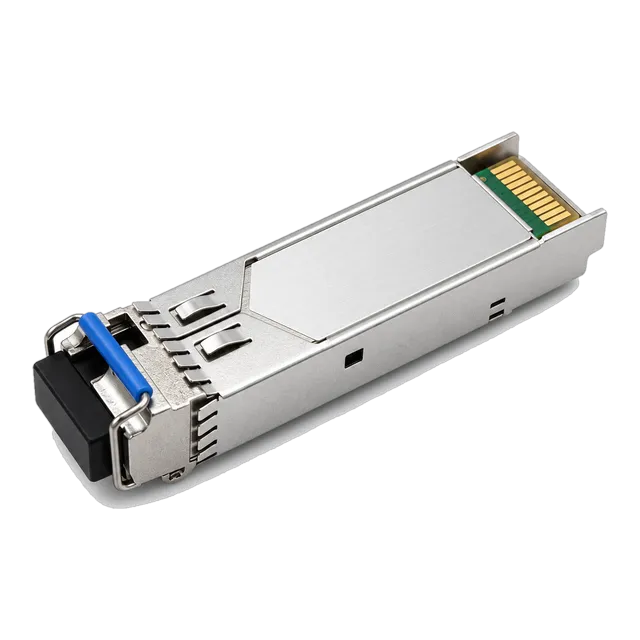
When engineering high-throughput aggregation nodes, selecting the correct uplink optics prevents saturation. The 1.25G Gigabit SFP Transceiver — 1000Base SM/MM provides cost-effective 1 Gbps trunking up to 120 km over single-mode fibre, while high-density core uplinks leverage QSFP28 modules running 100 Gbps across distribution runs.
05Power over Ethernet standards and internal budget calculations
Power over Ethernet (PoE) delivers direct current power concurrently with Ethernet data over standard Cat5e or Cat6 twisted-pair cabling. Hardware platforms are governed by three primary IEEE standards:
- IEEE 802.3af (PoE / Type 1): Delivers up to 15.4 W per port from the Power Sourcing Equipment (PSE), guaranteeing 12.95 W at the Powered Device (PD) across 100 metres after cable resistance losses.
- IEEE 802.3at (PoE+ / Type 2): Supplies up to 30.0 W per port at the PSE, delivering a minimum of 25.5 W at the PD to run pan-tilt-zoom (PTZ) IP surveillance cameras and dual-band Wi-Fi access points.
- IEEE 802.3bt (4PPoE / Type 3 & 4): Utilises all four copper pairs in the cable to provide 60 W (Type 3) or 90 W to 100 W (Type 4) per port, powering high-draw edge computing units, LED building systems, and digital signage.
When specifying a PoE platform, calculating aggregate power budgets prevents system resets caused by overcurrent protection faults. Consider a real-world sizing scenario for an 8-port switch supporting four Class 4 PoE+ access points (requiring 25.5 W each) and two Class 3 PoE surveillance cameras (requiring 12.95 W each):
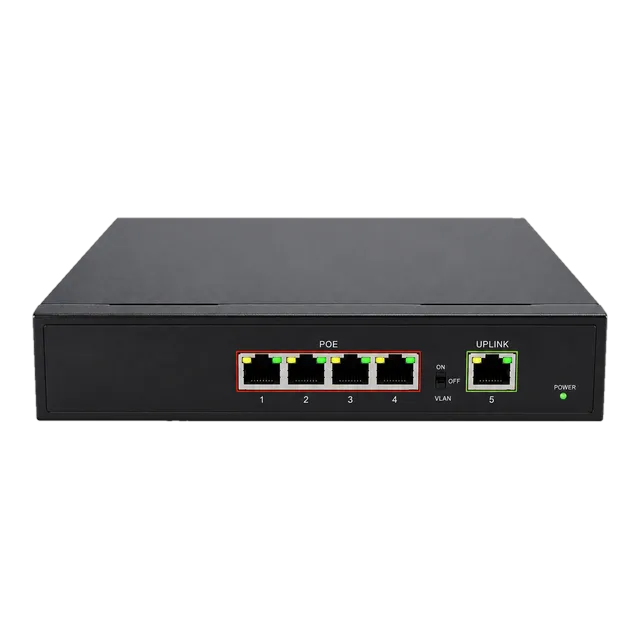
Total Connected Load = (4 × 25.5 W) + (2 × 12.95 W) = 102.0 W + 25.9 W = 127.9 W. Applying an industry-standard 20% engineering safety margin (127.9 W × 1.20) yields a minimum internal power supply requirement of 153.5 W. Compact hardware like the Gigabit PoE IP Ethernet Switch — 4 PoE Ports + 1 Uplink addresses localised deployments by providing up to 30 W per port under IEEE 802.3af/at with a dedicated, isolated copper uplink. For exhaustive power provisioning rules, consult our PoE switch engineering guide: standards, budgets and design.
06Industrial versus commercial ethernet switch design
An industrial ethernet switch operates in harsh environments where extreme temperature ranges, electromagnetic interference, and physical vibrations quickly degrade standard commercial hardware. Commercial switches are engineered for climate-controlled server racks (operating between 0°C and 40°C), whereas industrial hardened switches operate reliably across temperatures ranging from -40°C to +85°C using fanless, convection-cooled aluminium alloy enclosures with IP40 or higher ingress ratings.
Power supply resilience represents another key divergence. Commercial switches rely on 100–240 V AC internal power supplies with standard IEC inputs. Industrial switches employ dual-redundant DC terminal blocks accepting 12 V to 57 V DC inputs. This dual-input design allows systems to seamlessly fail over to battery backup banks or secondary solar rails without dropping active link state. In addition, industrial hardware is built to pass rigorous electromagnetic compatibility (EMC) testing defined under IEC 61000-4-2 (Electrostatic Discharge), IEC 61000-4-4 (Electrical Fast Transient/Burst), and IEC 61000-4-5 (Surge Immunity), ensuring uninterrupted performance near high-voltage motor drives and relays.
For deeper insight into choosing ruggedised switches for factory automation, utilities, and railway signalling, read our Industrial Switch Engineering and Procurement Guide.
07Resolving the 15 port ethernet switch requirement in network design
A 15 port ethernet switch is rarely produced as an off-the-shelf monolithic ASIC switch because switching silicon is manufactured in binary powers of two (such as 4, 8, 16, 24, 32, or 48 ports). Ethernet switch ASIC multiplexers split internal serialiser/deserialiser (SerDes) lanes symmetrically into quad or octal blocks. When an engineering bill of materials specifies 15 physical ports, procurement teams and network architects resolve the requirement using two industry approaches:
- Procuring a 16-Port or 18-Port Switch: The standard approach installs a 16-port chassis (for instance, 16× RJ45 or 16× RJ45 + 2× SFP). Leaving unused ports unpopulated provides a 1-to-3 port expansion headroom for network maintenance, packet mirroring, or network diagnostic taps.
- Coupling a Switch with Standalone Media Converters: In mixed-media deployments requiring 14 or 15 copper drops alongside an isolated fiber extension, engineers combine a compact 8-port or 16-port switch with a dedicated device like the 1.25G SFP UTP PoE Media Converter to interface the final drop without paying for modular optical line cards.
Sourcing a standard 16-port platform remains significantly more cost-effective than attempting to commission a non-standard custom ASIC build for odd port counts, ensuring compatibility with standard 19-inch rack mounting or DIN-rail chassis enclosures.
08Fibre integration using modular SFP transceivers and media converters
Modular optical transceivers extend an ethernet switch far beyond the 100-metre physical limitation of copper twisted-pair cabling. Small Form-Factor Pluggable (SFP) cages, defined by the SFF-8472 multi-source agreement (MSA), allow network engineers to tailor port transmission characteristics based on distance, fibre type, and wavelength requirements. Optical transceivers interface directly with internal switch SerDes lanes without requiring intermediate analogue filtering.
Depending on infrastructure cabling, switches accept either multimode fibre (MMF) using short-wavelength 850 nm vertical-cavity surface-emitting lasers (VCSEL) for links up to 550 metres, or single-mode fibre (SMF, ITU-T G.652.D) using 1310 nm or 1550 nm Fabry-Perot (FP) and Distributed Feedback (DFB) lasers for links exceeding 10 km to 80 km. Where field fiber capacity is constrained, bidirectional (BiDi) optics transmit and receive across a single optical strand using Wavelength Division Multiplexing (WDM) diplexers—commonly pairing 1310 nm and 1550 nm wavelengths.
Engineers deploying copper uplinks over legacy SFP ports can install copper transceivers evaluated in our Copper SFP Transceiver Engineering & Deployment Guide, providing complete physical media flexibility directly across the switch faceplate.
09Latency, buffering, and packet drop prevention in converged networks
Packet drops in an ethernet switch occur when egress buffers saturate during microbursts—transient spikes where multiple ingress ports transmit simultaneously to a single egress port. To manage bursty storage, video, and industrial control traffic, switch ASICs deploy either dedicated per-port packet buffers or a shared dynamic buffer pool. Shared dynamic buffer pools allocate memory dynamically from a global cache (typically 2 MB to 16 MB on access switches, 32 MB or more on aggregation switches), absorbing microbursts far more effectively than static per-port partitions.
Hardware platforms implement flow control mechanisms to mitigate buffer exhaustion under sustained traffic. IEEE 802.3x Flow Control transmits standard Ethernet PAUSE frames across the link, signalling the upstream transmitter to halt transmission for a designated pause interval. However, IEEE 802.3x pauses all traffic indiscriminately across the physical link, potentially delaying critical latency-sensitive control packets.
Converged networks addressing video, audio, or telemetry deploy Priority-Based Flow Control (PFC) governed by IEEE 802.1Qbb. PFC operates independently across eight Class of Service (CoS) priority queues within the IEEE 802.1Q header tag. By pausing only lower-priority queues during periods of congestion, the switch maintains lossless transmission for high-priority operational technology (OT) or Voice over IP (VoIP) streams without dropping packets.
10Network management tiers: unmanaged, smart, and fully managed switches
Selecting an ethernet switch requires matching management requirements to operational network complexity across three primary tiers:
- Unmanaged Switches: Feature-fixed, plug-and-play appliances containing no web interface, console port, or IP configuration address. They execute IEEE 802.3 auto-negotiation and auto MDI/MDI-X cable crossover detection automatically in hardware. They are suitable for simple machine-level networks, remote field nodes, or edge branches where remote diagnostics are unnecessary.
- Smart (Web-Managed) Switches: Mid-tier devices equipped with an embedded HTTP/HTTPS graphical user interface. They support fundamental Layer 2 management tools, including VLAN tagging (IEEE 802.1Q), link aggregation (LACP IEEE 802.3ad), QoS traffic prioritization (IEEE 802.1p), and basic port mirroring for traffic sniffers.
- Fully Managed Enterprise Switches: High-end platforms featuring a Command Line Interface (CLI) accessible via SSH, Telnet, and RS-232/USB console ports, alongside SNMPv2c/SNMPv3 and REST APIs for automated orchestration. These units feature comprehensive spanning tree protocols (RSTP IEEE 802.1w, MSTP IEEE 802.1s) to eliminate physical network loops, alongside dynamic Access Control Lists (ACLs), 802.1X Network Access Control (NAC), and Remote Monitoring (RMON) telemetry.
11Checklist for preparing an ethernet switch RFQ and procurement specification
Engineers preparing a request for quotation (RFQ) or procurement specification for an ethernet switch must provide unambiguous mechanical, electrical, and switching parameters to ensure vendor bids meet operational requirements.
- Port Count and Media Types: State required physical interface counts, specifying RJ45 copper ports (10/100/1000BASE-T, 2.5GBASE-T) and modular optical uplink slots (SFP, SFP+, QSFP28). Define exact split requirements (e.g., 16× RJ45 + 2× SFP).
- Switching Capacity and Forwarding Rate: State minimum acceptable backplane bandwidth in Gbps and packet forwarding throughput in Mpps, ensuring non-blocking wire-speed forwarding across all ports.
- Power Requirements: Define supply type (100–240 V AC vs. 12–48 V DC terminal blocks). For PoE models, detail required standards (802.3af, 802.3at, 802.3bt), per-port wattage, and aggregate total PoE power budget in Watts.
- Environmental and Ingress Protection: Specify operating temperature range (commercial 0°C to 40°C vs. wide-temperature industrial -40°C to +85°C), mounting style (19-inch 1U rack-mount vs. 35 mm DIN-rail), and IP ingress rating (IP20, IP30, IP40, or outdoor rated IP67).
- Layer Capabilities and Redundancy Protocols: Identify Layer 2 switching features (802.1Q VLAN, IGMP Snooping, LACP) or Layer 3 hardware routing requirements (static routing, OSPFv2/v3). Specify required network resilience standards (RSTP, MSTP, or ITU-T G.8032 ERPS ring switching under 20 ms).
- Management and Monitoring: Document requirements for SNMPv3, SSHv2, DDM optical monitoring pass-through (SFF-8472), Syslog, and port mirroring capabilities.
12Frequently asked questions
What is the difference between an ethernet switch and an ethernet hub?
An ethernet hub is a physical-layer Layer 1 repeater that broadcasts incoming frames across all ports indiscriminately, creating a shared collision domain. An ethernet switch operates at Layer 2, inspecting MAC addresses to forward packets exclusively to the intended destination port, creating dedicated full-duplex transmission bandwidth for every connected device.
Can an RJ45 switch port connect directly to an SFP port?
Yes, an RJ45 switch port can connect directly to an SFP port using either an SFP-to-RJ45 copper transceiver installed into the SFP slot, a dedicated standalone media converter, or a hybrid copper-to-fiber cable assembly. The link auto-negotiates speed and duplex settings according to IEEE 802.3 Ethernet specifications.
Why are there no true 15 port ethernet switches on the market?
Ethernet switch ASICs are designed with binary silicon architecture (4, 8, 16, 24, 48 ports) based on internal SerDes multiplexer channel groupings. Network designers requiring 15 physical ports deploy a standard 16-port or 18-port switch, leaving the unpopulated port available for system maintenance, testing, or link aggregation expansion.
How do I calculate if an ethernet switch is non-blocking?
Calculate the non-blocking backplane requirement by multiplying the sum of all physical port data rates by two to account for full-duplex communication. A 16-port Gigabit switch with two 10G uplinks requires an internal switching fabric of at least 72 Gbps: (16 × 1 Gbps × 2) + (2 × 10 Gbps × 2).
What is the maximum distance supported by an RJ45 ethernet switch?
Standard RJ45 copper ports operating 10BASE-T, 100BASE-TX, 1000BASE-T, and 10GBASE-T over balanced twisted-pair cabling support a maximum channel distance of 100 metres (328 feet), as specified by IEEE 802.3 and TIA-568 standards. Distances beyond 100 metres require optical transceivers, fibre media converters, or PoE extenders.
Technical review note: confirm model-specific specifications with the product datasheet and the intended host documentation. Product images and application photographs are illustrative.
Discuss this with our team