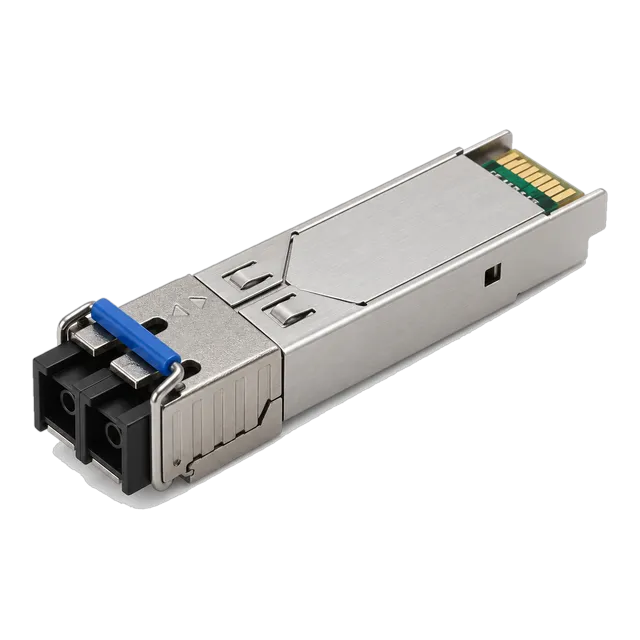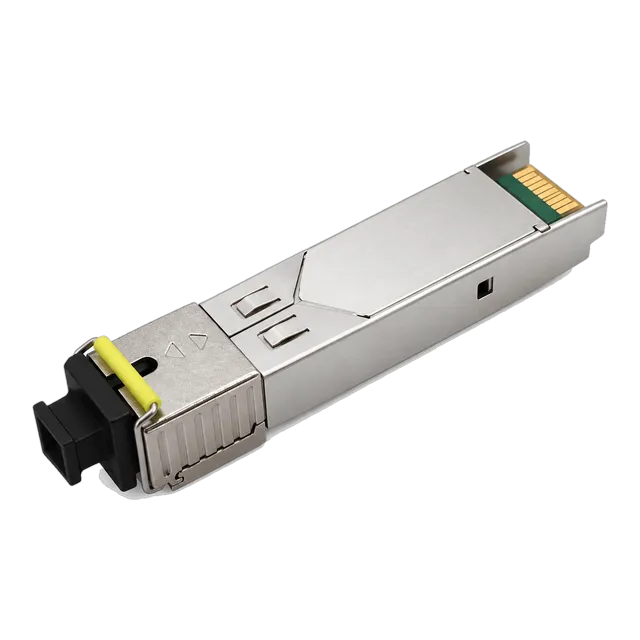
155M SFP BiDi Single-Mode Transceiver 1310/1550nm 20km SC
- Data Rate155 Mbps
- WavelengthTx 1310 / Rx 1550 nm (single fiber BiDi)
- Transmission Distance20 km


155M SFP · 2 models
155M SFP transceivers for Fast Ethernet and STM-1 ports, in 1310 nm duplex 10 km and single-fiber BiDi 20 km builds with DDM. Specifications and enquiry.
Buying guide
A 155M SFP is a Fast Ethernet class pluggable optic. It runs at 155 Mb/s, which matches 100BASE-FX and 100BASE-LX Ethernet ports and the STM-1 rate used in legacy transmission equipment. Modules of this class remain in demand long after Gigabit became the norm, because industrial controllers, older access multiplexers, utility and rail networks, building systems and small remote sites still terminate on Fast Ethernet fibre ports that cannot be swapped out easily. Fitting a Gigabit optic to those ports does not work, since most Gigabit modules will not lock at the lower line rate.
The two builds listed here cover the common cases. The first is a dual-fibre module at 1310 nm over single-mode fibre, specified for 10 km, with a duplex LC interface and an SC option. The second is a single-fiber BiDi module that transmits at 1310 nm and receives at 1550 nm on one strand, specified for 20 km, supplied with a simplex SC interface and an LC option. Both run from 3.3 V, work from 0 to 70 degrees Celsius and support digital diagnostics.
Selection comes down to three questions. How many fibre strands are available, which connector style the existing patch panel uses, and what the measured loss of the route is. Legacy plant often mixes SC and LC hardware, so confirm the connector before ordering. As with any pluggable, the coding expected by the host platform should be checked as well.
Models
Filter the family, then open a model for the full specification table, illustrations and ordering information.
Selection
What to specify when ordering a 155M SFP, and the options available in this range.
| What to specify | Options in this range | Notes |
|---|---|---|
| Line rate | 155 Mb/s | Matches 100BASE-FX, 100BASE-LX and STM-1 ports |
| Fibre strands | Dual fibre or single fibre BiDi | BiDi uses one strand and ships as a matched pair |
| Wavelength | 1310 nm duplex, Tx 1310 / Rx 1550 nm BiDi | BiDi ends must be opposite halves of a pair |
| Reach | 10 km duplex, 20 km BiDi | Size against measured loss on the installed fibre |
| Connector | Duplex LC with SC option, simplex SC with LC option | Older patch frames are frequently SC |
| Diagnostics and coding | DDM supported, coding per platform | State the host equipment model when enquiring |
Listed values describe the published range. Confirm the exact model datasheet, host coding and installed link before ordering.
Before you order
The most common mistake on Fast Ethernet fibre ports is fitting a 1.25G module because it is what is on the shelf. Gigabit optics are designed around a 1.25 Gb/s line rate and generally will not lock at 155 Mb/s, so the link either never comes up or comes up unstable. Unless a module is explicitly specified as dual rate, match the optic to the port rate. Where a port has to serve both rates on different days, say so at the enquiry stage rather than assuming.
Equipment of this generation is often patched with SC connectors, while newer structured cabling is almost entirely LC. Both builds in this range can be supplied in either style, so it is worth checking the patch panel and the existing jumpers before ordering rather than discovering the mismatch during a maintenance window. Where a site is mixed, standardising the jumpers is usually tidier than holding hybrid leads. Record which connector each site uses so repeat orders stay consistent.
The BiDi build transmits at 1310 nm and receives at 1550 nm, so it only works against a module with the opposite assignment. Order the two halves together for every link and label them at each end. Keep spares of both halves rather than doubling up on one, because a single spare of the wrong half cannot restore a failed link. This matters more on remote or unstaffed sites where a second visit is expensive.
Fast Ethernet links frequently run over fibre that has been in the ground for many years and has been spliced or re-terminated more than once. A 10 km specified module on an 8 km route can still fail if the accumulated loss is high. Take an end-to-end loss measurement before choosing the reach class, clean every connector face before insertion, and use the module's digital diagnostics afterwards to record the received power as a reference for future fault finding.
FAQ
It provides a fibre interface for equipment that runs at 155 Mb/s, which covers 100BASE-FX and 100BASE-LX Fast Ethernet ports and STM-1 transmission ports. In practice that means industrial controllers, older access and transmission gear, utility, rail and building networks, and small remote sites where the equipment is still serviceable and the fibre plant is already in place.
In most cases no. Gigabit modules are built around a 1.25 Gb/s line rate and will not reliably lock at 155 Mb/s, so the link either fails to come up or runs unstable. A module has to be specified as dual rate to cover both. If the host port is fixed at 100 Mb/s over fibre, order a 155M module and match the wavelength, reach and connector to the installed plant.
The duplex model uses two fibre strands at 1310 nm and terminates in a duplex connector, with 10 km specified reach. The BiDi model carries both directions on one strand, transmitting at 1310 nm and receiving at 1550 nm, with 20 km specified reach and a simplex connector. Choose BiDi when only one strand can be allocated, and remember that it must be ordered as a matched pair.
Yes. Both builds report transmit power, receive power, temperature, supply voltage and bias current through digital diagnostics, provided the host equipment can read and display them. Older platforms sometimes read only part of the data or need the feature enabled. Record the received power figure when the link is first commissioned, since a later drop from that baseline is the quickest indication of a dirty or damaged connector.
Related families
Next step
Send the host platform, the fibre you have and the distance you need. We will shortlist the models that actually work and quote them.