Selecting an enterprise-grade gigabit switch requires matching forwarding fabric to full non-blocking line rates, sizing power supplies against maximum IEEE 802.3at device draw, and deploying MSA-compliant optical uplinks to eliminate downstream aggregation bottlenecks.
01What is a gigabit switch and how does it process traffic?
A gigabit switch is a Layer 2 or Layer 3 networking appliance that switches Ethernet frames at 1,000 megabits per second (1 Gbps) across physical ports according to IEEE 802.3ab specifications. Inside an enterprise gigabit network switch, incoming frames hit a physical layer (PHY) transceiver, pass through a Media Access Control (MAC) block, and enter an application-specific integrated circuit (ASIC) that handles parsing, packet classification, and forwarding table lookups. The ASIC maintains a Content Addressable Memory (CAM) table that correlates destination MAC addresses with specific egress ports. If an address is absent from the CAM table, the switch broadcasts the frame across all ports within the broadcast domain until a reply establishes the path. For detailed physical layer media interconnections, see our unmanaged ethernet switch guide.
02How to calculate forwarding capacity and backplane bandwidth
Switch backplane bandwidth and packet forwarding rates dictate whether a network switch gigabit ethernet deployment operates without dropping frames under saturated conditions. Full-duplex Gigabit Ethernet requires 1 Gbps ingress and 1 Gbps egress simultaneously per port, totaling 2 Gbps of throughput per connection. To evaluate non-blocking switching fabric capacity, use the standard non-blocking switching capacity formula:
$$\text{Switching Capacity (Gbps)} = \text{Port Count} \times 2\text{ Gbps}$$
For a standard 24-port 1 gb switch equipped with four 10 Gbps SFP+ uplinks, the calculation yields:
$$(24 \times 2\text{ Gbps}) + (4 \times 20\text{ Gbps}) = 48\text{ Gbps} + 80\text{ Gbps} = 128\text{ Gbps}$$
Packet forwarding rate uses the standard minimum Ethernet frame size of 84 bytes (64-byte payload plus 8-byte preamble/SFD and 12-byte inter-packet gap), generating 1,488,095 packets per second (1.488 Mpps) per gigabit port. The forward rate calculation for this configuration is:
$$(24 \times 1.488\text{ Mpps}) + (4 \times 14.88\text{ Mpps}) = 35.712\text{ Mpps} + 59.52\text{ Mpps} = 95.232\text{ Mpps}$$
If the hardware datasheet lists switching capacity below 128 Gbps or forwarding below 95.23 Mpps, the switch relies on oversubscribed buffers and will discard packets under sustained burst loads.
03Unmanaged gigabit network switch vs managed gigabit switch
An unmanaged gigabit network switch forwards traffic out of the box using fixed Layer 2 auto-negotiation, whereas a managed gigabit switch provides granular traffic segmentation, telemetry, and link redundancy. Unmanaged units run fixed ASICs without configuration interfaces, making them reliable and low-cost for small workgroups or peripheral bridging. Conversely, managed gigabit ethernet switches expose command-line interfaces (CLI) and SNMP agents, enabling 802.1Q Virtual Local Area Networks (VLANs), Spanning Tree Protocol (IEEE 802.1D/w/s), and port aggregation (IEEE 802.3ad LACP). Engineers needing dedicated network isolation, Quality of Service (QoS) queues for SIP trunking, or 802.1X port-level security must select managed platforms to prevent broadcast storms and security breaches across local infrastructure.
04Deploying a managed PoE switch for IP devices
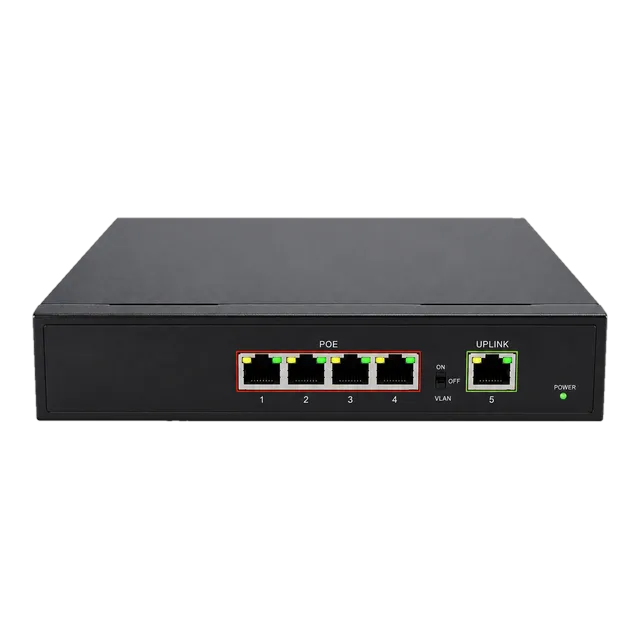
A managed poe switch delivers direct current alongside gigabit data over 4-pair unshielded twisted pair cabling to eliminate individual power supplies at edge locations. Under IEEE 802.3af (PoE), the power sourcing equipment (PSE) outputs up to 15.4 W per port to supply 12.95 W to powered devices (PDs). Under IEEE 802.3at (PoE+), PSE supplies up to 30.0 W to deliver 25.5 W at distances up to 100 metres over Cat5e or Cat6 cabling. Devices such as pan-tilt-zoom cameras, Wi-Fi 6 access points, and VoIP terminals negotiate current levels via Layer 2 Link Layer Discovery Protocol (LLDP) extensions. Deployments requiring compact power delivery can utilise units like the Gigabit PoE IP Ethernet Switch — 4 PoE Ports + 1 Uplink, which delivers up to 30W per port compliant with IEEE 802.3af/at standards. Comprehensive deployment parameters are detailed in our PoE switch standards and power budget guide.
05Choosing port densities: from 2 port ethernet switch to 10 port network switch
Switch port density must be chosen to match spatial constraints, port expansion thresholds, and thermal envelopes. While core aggregation demands 24-port or 48-port chassis, edge connectivity often relies on compact form factors. A 2 port ethernet switch or two port network switch functions primarily as an isolation bridge, inline monitoring tap, or perimeter media interface. Moving up, a 4 port network switch or 5 port lan switch handles desktop clusters, access point nodes, and edge kiosk connectivity where a larger ethernet switch box would be physically prohibitive. For branch distribution, a 10 port network switch provides eight downstream access connections alongside dual dedicated optical uplinks, avoiding the thermal output and chassis depth of full 19-inch rack enclosures. The table below outlines standard port counts and target topologies across common form factors:
| Switch Configuration | Typical Uplink Ports | Form Factor | Primary Deployment Profile |
|---|---|---|---|
| 2 port / ethernet two port switch | 1× RJ45 or SFP | DIN-rail / inline | Point-to-point bridging, camera demarcation |
| 4 port to 5 port lan switch | 1× Shared RJ45 or SFP | Wall mount / desktop | Edge terminals, retail PoS, workstation pods |
| 8 port managed switch | 2× 1G SFP slots | 10-inch or desktop | Small office branch, secure workgroup segmentation |
| 10 port network switch | 2× 1G/10G SFP+ | Compact rack / wall | Multi-AP distribution, surveillance aggregation |
06Can an ethernet switch with WiFi replace physical drops?
An ethernet switch with wifi combines a managed or unmanaged switching core with an integrated wireless access point radio, but it cannot fully replace structured physical copper or optical links. Wireless ethernet switch units share a half-duplex radio medium prone to RF attenuation, multi-path interference, and channel contention across 2.4 GHz and 5 GHz spectrum bands. In contrast, every port on a dedicated gigabit network switch delivers symmetrical, dedicated full-duplex 1 Gbps bandwidth with deterministic sub-microsecond latency. Best practices dictate running dedicated Cat6a cabling from a central gb ethernet switch to ceiling-mounted autonomous access points powered by PoE, reserving integrated wireless switch appliances strictly for temporary setups or compact branch offices.
07Optical uplinks: extending a gb network switch with SFP modules
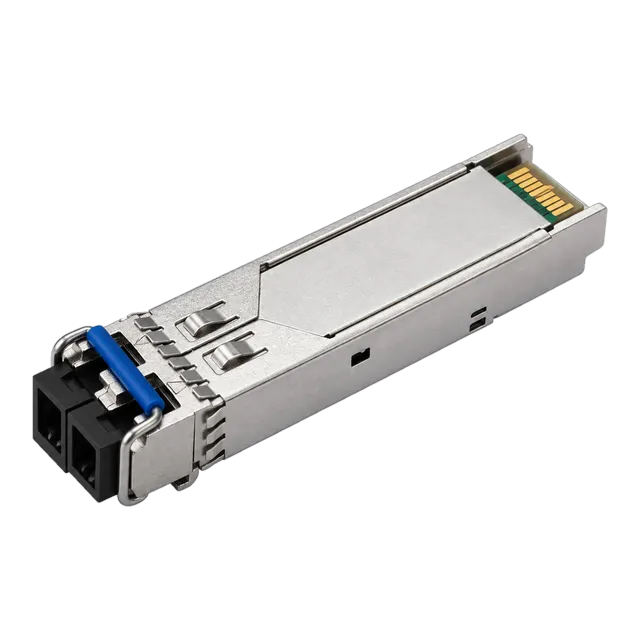
Optical uplinks prevent uplink bottlenecks by connecting an edge gigabit switch to building distribution backbones using Small Form-Factor Pluggable (SFP) transceivers over optical fibre. While standard 1000BASE-T copper ports are limited by IEEE 802.3ab to 100 metres over Cat5e/Cat6, Small Form Factor Pluggable optical transceivers operate across kilometres. Inserting transceivers such as the 1.25G SFP Transceiver Module 1310nm 10/20km Duplex LC DDM into dedicated SFP cages links switches up to 20 km away over OS2 single-mode fibre (ITU-T G.652.D) using standard duplex LC connectors. For single-strand installations where conduit space is constrained, Bidirectional (BiDi) transceivers isolate upstream and downstream channels onto distinct optical wavelengths, as documented in our BiDi transceiver engineering guide. Browse options in our 1.25G SFP module family for diverse reach profiles.
08Bridging copper and optical links with media converters
When an unmanaged gigabit switch lacks dedicated optical SFP slots, external media converters translate electrical Ethernet pulses directly into optical signals at physical Layer 1. The IEEE 802.3u and 802.3z standards define the electrical-to-optical conversion mechanisms that maintain line-rate throughput without introducing frame-buffer latency. For unmanaged edge hardware lacking optical interfaces, connecting an external 10/100/1000 Gigabit Fiber Media Converter — Single-Mode allows any standard RJ45 port to transition onto single-mode optical lines spanning up to 20 km over 1310 nm wavelengths. Furthermore, high-reliability installations require Link Fault Pass-Through (LFPT) on the converter, ensuring that a link drop on the optical segment drops the copper carrier immediately to trigger rapid Spanning Tree reconvergence upstream.
09Upgrading from 1G to a 10 gbps ethernet switch backbone
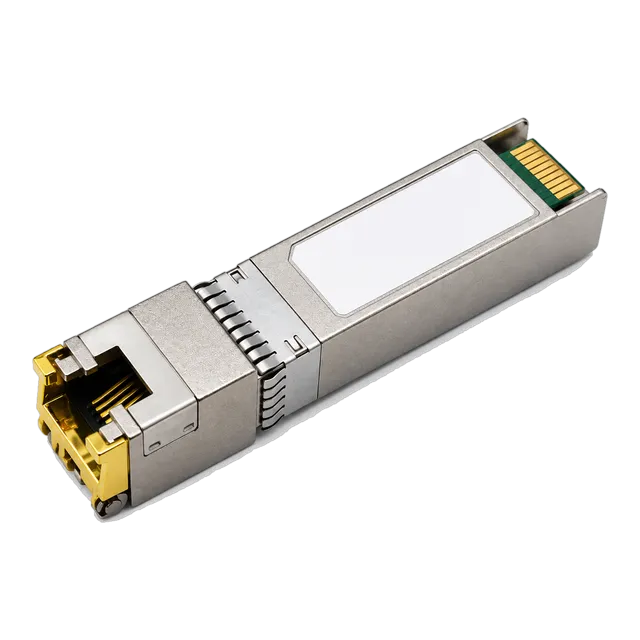
Migrating backbone tiers from 1 Gbps to a 10 gbps ethernet switch architecture resolves oversubscription when multiple access switches aggregate toward central compute or storage nodes. A traditional 1 giga byte switch aggregating 24 edge ports down a single 1G link creates a 24:1 oversubscription ratio, driving input buffer overflows during traffic spikes. Upgrading core downlinks to a 10 gig ethernet switch or utilizing 10G SFP+ copper transceivers like the 10G SFP+ Copper RJ45 10GBASE-T 100m Cat6a/Cat7 Multi-Rate Transceiver shifts the oversubscription down to 2.4:1. This multi-rate auto-negotiation transceiver allows network teams to bridge 10G SFP+ cages directly to Cat6a copper patches over distances up to 100 metres without re-pulling structured cabling.
10Industrial vs commercial ethernet switch box physical architectures
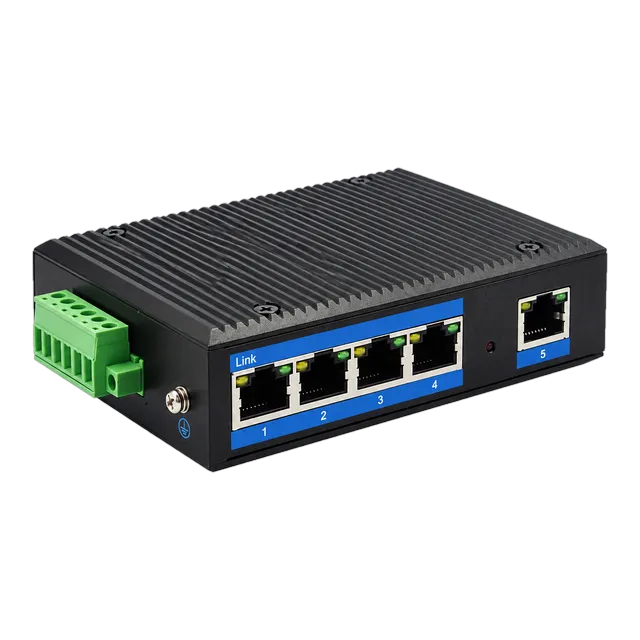
Commercial office switches operate within controlled climate envelopes of 0°C to 40°C using active cooling fans, while an industrial ethernet switch box is engineered for harsh plant floors, outdoor enclosures, and transport hubs. Industrial gigabit switches feature IP30 or IP40 rated aluminium chassis that dissipate heat through natural convection, operating reliably between -40°C and +85°C. For unconditioned field installations, appliances such as the Outdoor Industrial Gigabit Ethernet Switch — 5× RJ45 Port provide dual redundant 10–47V DC inputs and robust electrostatic discharge (ESD) protection to survive lightning-induced transients and industrial power fluctuations. Explore our complete range in the Ethernet switch product family.
11Troubleshooting packet loss and link errors on a home lan switch
Packet loss, excessive cyclic redundancy check (CRC) errors, and degraded throughput on a home lan switch or enterprise access edge switch stem from cabling faults, frame negotiation mismatches, or buffer exhaustion. Systematic isolation identifies the failure domain across physical layer copper, optical interfaces, and MAC layer flow settings:
- Verify physical cable integrity using a time-domain reflectometer (TDR) to rule out split pairs, near-end crosstalk (NEXT), or Cat5 terminations failing to support 1000BASE-T transmission.
- Inspect port auto-negotiation parameters to verify that both endpoints operate at full duplex without mismatched manual speed overrides that generate runt packets.
- Check the switch interface error counters via CLI or web management for input discards, which indicate that the internal packet buffer cannot handle ingress bursts.
- If using optical SFP uplinks, read Digital Diagnostic Monitoring (DDM) values per SFF-8472 to confirm received optical power ($P_{rx}$) falls within the receiver dynamic range.
- Review port VLAN allocations and disable 802.3x flow control if head-of-line blocking pauses traffic across unrelated switch ports.
12Procurement checklist for optical switches and modules
Procuring switches and transceivers requires verifying electrical, optical, and environmental specifications before submitting a Request for Quotation (RFQ). Use this technical checklist to validate compliance across hardware vendors:
- Port Form Factor and Rates: Confirm the required breakdown of 10/100/1000BASE-T RJ45 ports and 1G/10G SFP/SFP+ optical cages.
- Switching Fabric: Validate full non-blocking backplane bandwidth and packet forwarding rates matching maximum theoretical load.
- Optical Transceiver Compatibility: Specify Multi-Source Agreement (MSA) EEPROM coding requirements to match your host platform firmware.
- Optical Link Budget: Verify transmitter optical power ($P_{tx}$) and receiver sensitivity ($P_{rx}$) against span loss using our optical link budget calculator.
- Power Budget Requirements: Calculate total connected PoE class draws plus a 20% headroom factor against internal PSE power supply wattage.
- Operating Environment: Determine whether commercial (0°C to 70°C) or industrial (-40°C to 85°C) temperature grades are mandated.
- Management and Layer 3 Features: State required protocols including IEEE 802.1Q, 802.3ad LACP, 802.1w RSTP, and static/dynamic routing.
For custom transceiver coding, multi-rate options, or industrial switch procurement, submit your Bill of Materials directly via our contact and RFQ portal.
13Frequently asked questions
What is the difference between a gigabit switch and a 100 Mbps switch?
A gigabit switch processes data at 1,000 Mbps using IEEE 802.3ab over four copper wire pairs, whereas a 100 Mbps Fast Ethernet switch maxes out at 100 Mbps over two pairs. Gigabit switching delivers tenfold bandwidth, reduces frame latency, and supports modern high-throughput local network traffic.
Can I use Cat5 cable with a gigabit switch?
Standard Cat5 cabling can struggle with gigabit speeds due to crosstalk issues over long distances. While IEEE 802.3ab theoretically supports Cat5, Cat5e or Cat6 is strongly recommended to guarantee full 1,000 Mbps transmission up to the maximum 100-metre channel limit without packet errors.
What does a managed gigabit switch do that an unmanaged switch cannot?
A managed gigabit switch gives administrators granular control over local traffic using VLAN segmentation, Spanning Tree redundancy, Quality of Service queuing, and port mirroring. An unmanaged switch operates strictly as a plug-and-play device without configuration options, remote monitoring, or security controls.
How much power does a PoE gigabit switch supply per port?
Under IEEE 802.3af (PoE), a gigabit switch supplies up to 15.4 W per port, delivering 12.95 W to the terminal device. Under IEEE 802.3at (PoE+), it delivers up to 30.0 W at the port, providing 25.5 W to support high-draw appliances like PTZ cameras.
Do I need SFP ports on my gigabit switch?
SFP ports are necessary if your switch must connect to optical fibre backbones exceeding the 100-metre distance limit of copper cabling. SFP cages allow you to insert modular optical transceivers for multimode or single-mode links ranging from 550 metres up to 120 kilometres.
What is the difference between switching capacity and forwarding rate?
Switching capacity measures total backplane bandwidth in gigabits per second (Gbps) across all ports simultaneously. Forwarding rate measures the switch's processing speed in millions of packets per second (Mpps), calculated using 64-byte minimum frames to define real-world packet processing capacity.
Technical review note: confirm model-specific specifications with the product datasheet and the intended host documentation. Product images and application photographs are illustrative.
Discuss this with our team