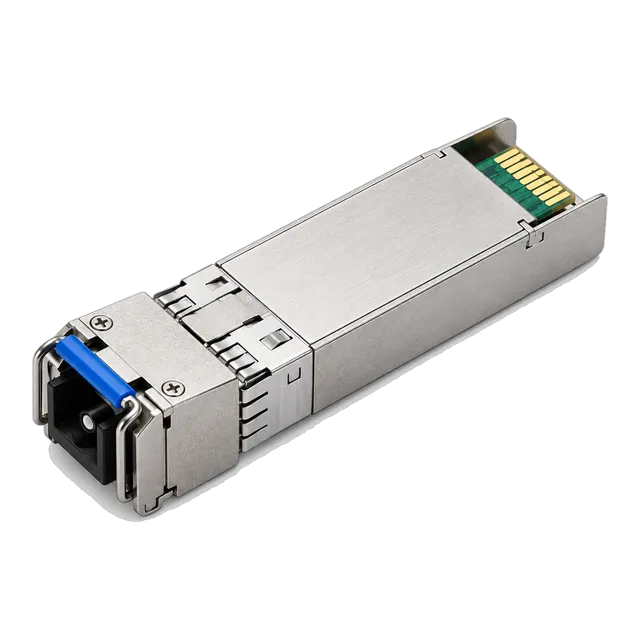
A reach figure on a datasheet describes a category of module, not your cable plant; only a loss calculation against the module's real power budget tells you whether the link will work.
01What a reach label really means
A transceiver described as a 20 km module is a module built to a class of optical performance: a laser of a certain type and launch power, a receiver of a certain sensitivity, and a wavelength plan that the manufacturer expects to carry traffic across a reference span of that length. The reference span is a clean, mostly spliced single-mode route with a small number of connector pairs. Your route is not the reference span. It may be shorter but crowded with patch panels, or it may be nominally 18 km but built from three separate cable sections with older fiber and several repaired joints. The label is a shorthand for procurement, not a guarantee about your plant. The calculation that tells you whether the link will work is the optical link budget, and it takes about ten minutes with a datasheet and an accurate cable record.
02Two budgets: power available and loss required
Every link budget has two halves. The power budget is what the module gives you: minimum average launch power minus worst-case receiver sensitivity, both read from the datasheet in dBm, both taken at the worst end of the specified range rather than the typical value. If a module is specified with a minimum launch of minus 5 dBm and a worst-case sensitivity of minus 23 dBm, the power budget is 18 dB.
The loss budget is what the route consumes: fiber attenuation over distance, loss at every mated connector pair, loss at every splice, any passive component such as a splitter or a WDM filter, and a design margin held back for ageing, repairs and measurement uncertainty. The link is viable when total route loss plus margin is less than the power budget. Anything else is optimism.
03Fiber attenuation by wavelength and fiber type
Single-mode fiber to ITU-T G.652 is normally planned at about 0.35 dB per kilometre in the 1310 nm window and about 0.22 dB per kilometre in the 1550 nm window. Those are planning figures; installed cable can be slightly better or, on older or tightly routed plant, worse. Multimode fiber is far lossier per kilometre, commonly planned at around 3 dB per kilometre at 850 nm, with structured cabling standards allowing up to 3.5 dB per kilometre, which is one reason multimode reach is measured in tens or hundreds of metres rather than kilometres.
This is also why long-reach modules cluster around 1550 nm. A 1550 nm module such as the 1.25G SFP dual-fiber 1550 nm 80 km transceiver spends roughly 17.6 dB on 80 km of fiber; the same distance at 1310 nm would cost about 28 dB before a single connector is counted.
04Connectors, splices and the parts people forget
Connector loss dominates short and medium links far more often than fiber does. A mated connector pair is commonly planned at 0.3 to 0.75 dB depending on connector quality, polish and cleanliness; structured cabling standards frequently use 0.75 dB as a worst case and good field practice achieves the lower end. Fusion splices are planned at about 0.1 dB each, mechanical splices considerably more.
Count every mating point on the real route, not the ones on the drawing. A typical enterprise fiber run has a patch cord at each end, a panel connection at each end, and often a second panel pair in a meet-me room or building entrance. That is six mated pairs before any cross-connect. At 0.5 dB each that is 3 dB, equivalent to more than eight kilometres of single-mode fiber at 1310 nm.
05Design margin: what it is for and how much to keep
A common practice is to hold back around 3 dB of design margin on top of the calculated loss. The margin is not padding for its own sake. It covers component ageing over a multi-year service life, additional splices added by future cable repairs, seasonal and temperature variation, connector degradation from repeated handling, and the simple fact that your measurement instrument and your supplier's test set disagree by a few tenths of a decibel.
Routes that cross roads, rail or construction zones deserve more, because each repair adds two splices and sometimes a new closure. Routes inside a controlled data hall can carry less. What matters is that the margin is explicit and written into the design record, so that the next engineer who adds a patch panel can see how much headroom remains before the link stops working.
06Worked example one: a comfortable gigabit link
Take an 18 km single-mode route between two sites, served by a 1310 nm Gigabit SFP of the kind listed as a 1.25G SFP transceiver module 1310 nm 10 to 20 km duplex LC with DDM. Read the actual datasheet values; for this illustration assume a minimum launch of minus 5 dBm and a worst-case sensitivity of minus 23 dBm, giving an 18 dB power budget.
The route consumes 18 km at 0.35 dB per kilometre, which is 6.3 dB. Add four mated connector pairs at 0.5 dB, which is 2.0 dB, and three fusion splices at 0.1 dB, which is 0.3 dB. Total route loss is 8.6 dB. Add 3 dB of design margin and the requirement is 11.6 dB against 18 dB available. The link has 6.4 dB spare and is a sound design.
07Worked example two: the 20 km link that fails
Now take a 20 km campus-to-campus route with the same module and the same 18 dB power budget, but built through three buildings with intermediate patch panels and a cross-connect in a carrier meet-me room.
Fiber loss is 20 km at 0.35 dB per kilometre, which is 7.0 dB. There are twelve mated connector pairs, and because several are older and heavily handled they are planned at 0.6 dB, adding 7.2 dB. Eight splices at 0.1 dB add 0.8 dB. Route loss is 15.0 dB, and 3 dB of margin brings the requirement to 18.0 dB against 18 dB available. There is nothing left. The link may pass a bench test on day one and start erroring after the first repair. The module is not defective. The label said 20 km; the plant said otherwise.
08Fixing a link that does not close
There are three honest ways to close a failing budget. Reduce the loss, by eliminating unnecessary patch panels, replacing suspect patch cords, re-terminating poor connectors or converting a mechanical splice to a fusion splice. Increase the power budget, by specifying a longer-reach module class for the same distance, which is exactly why a 40 km or 60 km module is often the correct answer to a marginal 20 km route. Or change the wavelength plan, moving a long span from the 1310 nm window to 1550 nm where attenuation is roughly a third lower per kilometre.
What does not work is hoping that typical values apply to your link. Datasheet typical launch power is a manufacturing centre point, not a commitment, and design must use the minimum and worst-case columns.
09Multimode links are bandwidth-limited, not loss-limited
Short multimode links behave differently. A 100GBASE-SR4 QSFP28 on OM4 is not limited by attenuation over 100 m; the channel insertion loss allowed by the standard for these short parallel variants is on the order of one and a half to two decibels in total, so two or three cassette pairs can consume the whole allowance. The distance ceiling comes from modal bandwidth and dispersion rather than power.
Read the reach figures carefully. 40GBASE-SR4 is specified for 100 m over OM3 and 150 m over OM4. 100GBASE-SR4 is specified for 70 m over OM3 and 100 m over OM4, which is why catalogue entries such as the 100G QSFP28 SR4 850 nm MPO module quote 100 m. Building a 120 m OM3 run and fitting 100G SR4 optics will not work, however healthy the power looks.
10Dispersion and other penalties on long spans
Beyond roughly 40 km at 10G and above, loss is no longer the only constraint. Chromatic dispersion accumulates with distance and spectral width and eventually closes the eye at the receiver regardless of how much power arrives. This is why long-reach modules use narrower-linewidth sources, and why some very long single-channel links require dispersion compensation or a module built with an integrated amplifier, such as the 100G QSFP28 eZR4 100 km LWDM4 module with an integrated SOA.
Treat dispersion as a separate check against the module's specified dispersion tolerance, expressed in picoseconds per nanometre. Reflections matter too, particularly on single-fiber BiDi links where transmitter and receiver share one strand: poor return loss at a connector can degrade a link that passes a pure loss calculation.
11The opposite failure: too much light
Receivers have a maximum input power as well as a minimum. Fitting an 80 km module to a 2 km link drives the receiver into saturation, and the symptoms look like a bad link rather than an over-powered one: errors, flapping, high pre-FEC error counts, sometimes an interface that comes up and then fails under load.
The checks are simple. Compare the calculated received power against the module's overload or maximum input figure as well as its sensitivity. If the link is short and the module is long-reach, specify a fixed optical attenuator of the appropriate value at the receive side, chosen so that received power lands comfortably inside the operating window. In practice it is usually cheaper and more reliable to buy the right module class than to attenuate a mismatched one, but attenuators are the correct tool when a long-reach module must serve a short span.
12Verify with measurement, then keep the record
A budget is a prediction. Confirm it with an optical light source and power meter across the installed route at the working wavelength, which gives you the real end-to-end insertion loss, and use an OTDR to locate the individual events if the total is higher than expected. Once the link is live, digital diagnostics on the module report transmit and receive power, and the received value should sit close to the budgeted figure.
Write the result down: measured route loss, wavelength, number of mated pairs and splices, calculated margin, and the DDM reading on the day of turn-up. That record is what lets a future change be assessed in minutes. When you send an enquiry for modules, include route length, fiber type, connector count and measured loss if available, so that the module class can be matched to the plant rather than to a number on a label.
13Frequently asked questions
How do I calculate an optical link budget?
Subtract the module's worst-case receiver sensitivity from its minimum launch power to get the power budget in decibels. Then add the route loss: fiber length multiplied by attenuation per kilometre, plus every mated connector pair, plus every splice, plus any passive component. Add a design margin of around 3 dB. If route loss plus margin is below the power budget, the link closes.
Why does a 20 km module fail on a 20 km link?
Because the reach figure assumes a reference route with few connectors. Real routes add patch panels, cross-connects and repair splices. Twelve mated pairs at 0.6 dB each consume 7.2 dB, which is more than twenty kilometres of single-mode fiber at 1310 nm. Either reduce the number of mating points or specify a module class with a larger power budget.
What attenuation figures should I use for planning?
Plan single-mode fiber at about 0.35 dB per kilometre at 1310 nm and about 0.22 dB per kilometre at 1550 nm. Plan multimode at roughly 3 dB per kilometre at 850 nm. Use 0.3 to 0.75 dB per mated connector pair depending on connector quality, and about 0.1 dB per fusion splice. Replace planning figures with measured values once the route is tested.
Can a link have too much optical power?
Yes. Every receiver has a maximum input power as well as a sensitivity floor. A long-reach module on a short span saturates the receiver and produces errors that resemble a faulty link. Compare the expected received power with the module's overload figure, and fit a fixed optical attenuator on the receive side if the light level is above the operating window.
Does the budget change for single-fiber BiDi modules?
The arithmetic is the same, but two extra points apply. The two directions use different wavelengths, so attenuation per kilometre differs slightly between them and each direction should be checked separately. Reflections also matter more, because transmit and receive share one strand, so connector return loss and cleanliness carry more weight than on a dual-fiber link.
Technical review note: confirm model-specific specifications with the product datasheet and the intended host documentation. Product images and application photographs are illustrative.
Discuss this with our team